User Interface Overview
-> go to [App_Home]

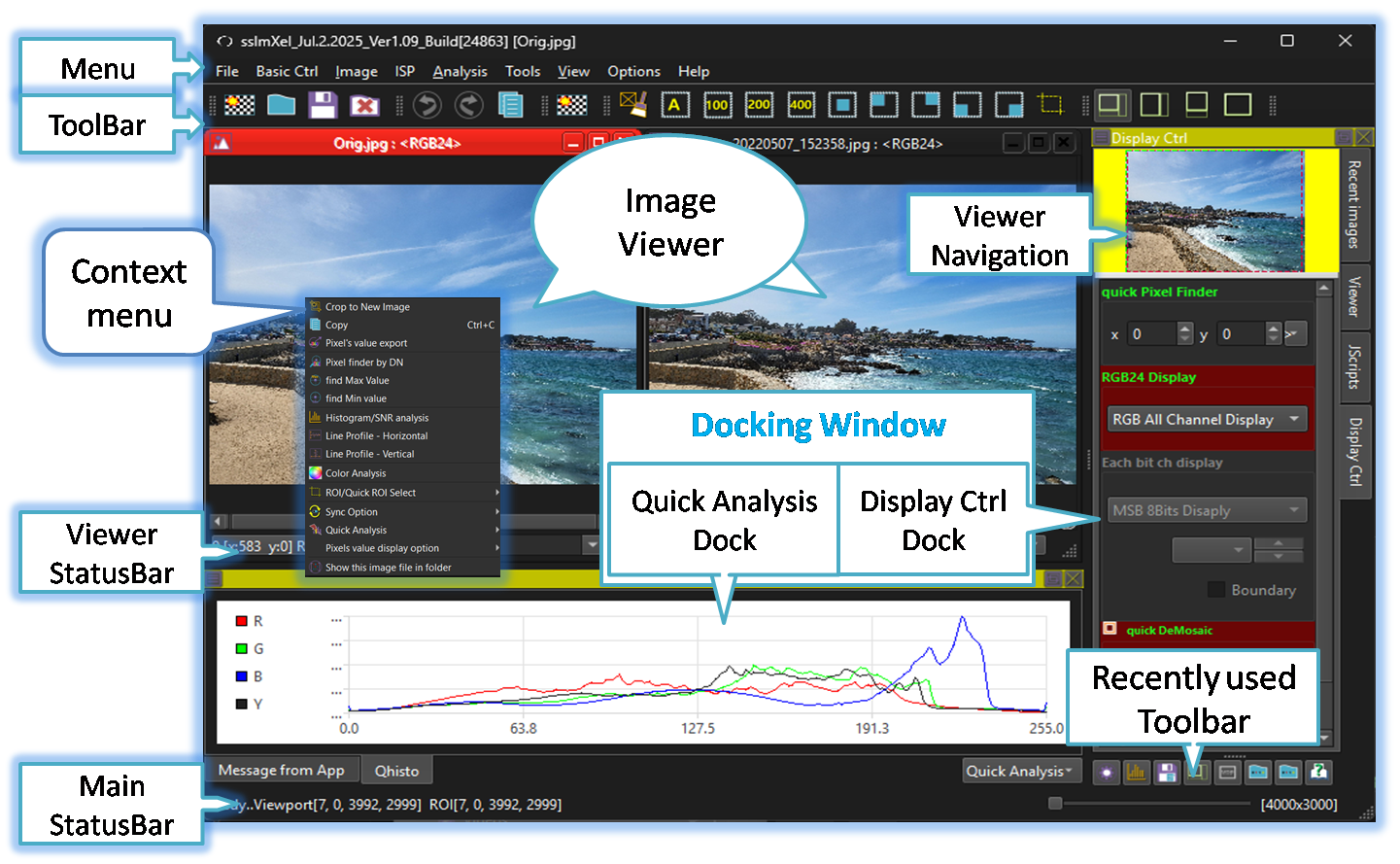
SSImXel tool typically features the following user interface components.
-
Menu
The menu provides structured access to key functions such as file handling, image display controls, analysis tools, processing operations, and scripting. Each section is organized for efficient navigation, allowing users to quickly perform tasks and configure the tool as needed. -
Toolbar
The toolbar offers quick access to commonly used functions such as image loading, zoom controls, region selection, and analysis tools. It provides a convenient shortcut to essential features, allowing users to perform frequent tasks more efficiently without navigating through menus.
and Users can configure the toolbar with their preferred combination of tools to match their workflow and usage preferences through Toolbar configuration Menu.
-
Context Menu
A pop-up menu in an image editor that appears on right-click, offering quick options like edit, resize, copy, or effects for faster access. -
Recently used Toolbar
displays as toolbar up to 8 recently used items accessed through the menu or toolbar, allowing quick access to previously working actions. -
Viewer Navigation
Convenient solution for Image Viewport Navigation, a feature that allows users to easily explore images by zooming in and panning across them. -
Docking Window
Allows users to organize workspace panels flexibly by snapping them to predefined zones or floating them independently.
SSImXel includes two docking windows: one for quick analysis and message logs, and another for handling image loading, display and view controls, and scripting functions.
-
Dock-Display/Scripts
Recent Image Load, Display Control and Script Control. -
Dock-Quick Analysis/Log
Quick Analysis and Message Log .
-
Dock-Display/Scripts
-
Viewer StatusBar
The viewer's status bar displays the pixel value at the current mouse position, the displayed zoom ratio of the image, and the image dimensions. -
Mainframe StatusBar
The mainframe status bar displays image processing progress, basic signal or noise information within the ROI, and when the viewer size is relatively small, it shows the displayed zoom ratio and image dimensions for the currently active image.

- App_Home (Parent Menu)