SSImXel - Basic Ctrl / Mouse

Mouse
SSImXel provide 44 diffent mode @ icon-camera for Mouse control
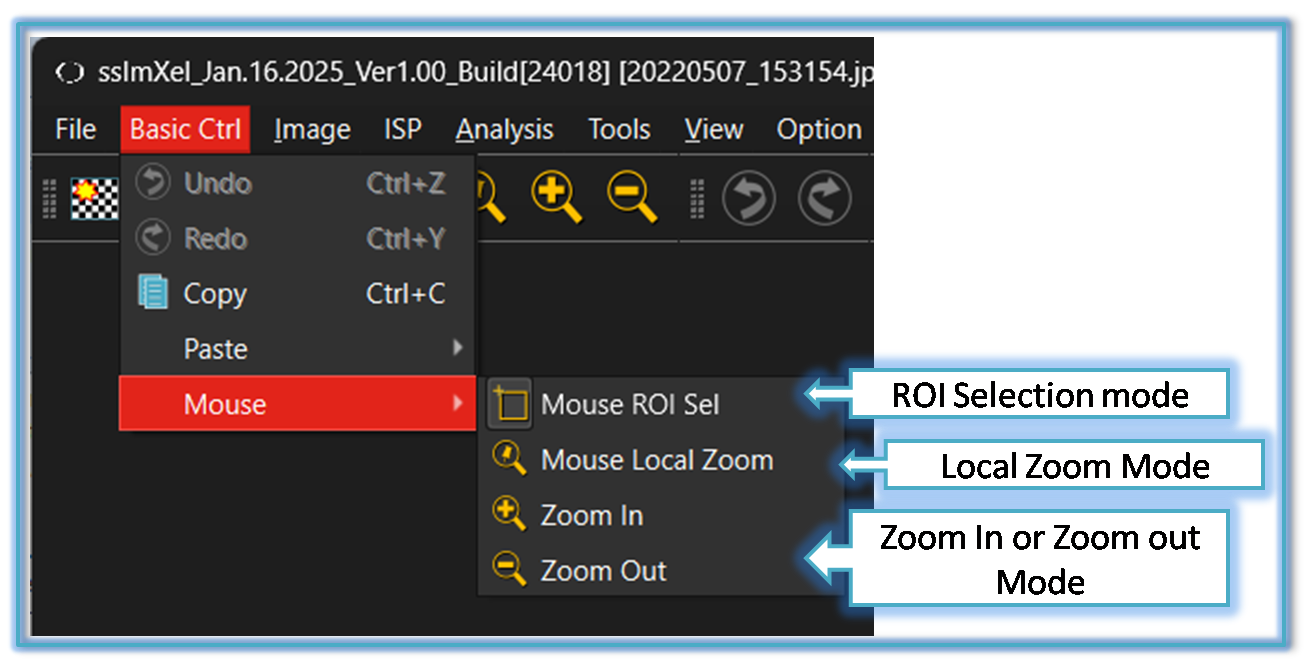
1. ROI Selection Mode 
Users can manually select the area of interest by dragging and drawing a rectangle
if user choose this mode, the mouse cursor will be changed to system default cursor
2. Local Zooming Mode 
This mode allow users can magnify local area zoom in by Mouse dragging with left button pressed
if user choose this mode, the mouse cursor will be changed as this 
For more details regarding Local Zooming click here
3. Zoom In Mode 
This mode allow users to magnify specific areas of an image to see or analysis finer details
if user choose this mode, the mouse cursor will be changed as this 
4. Zoom Out Mode 
This mode allow users to see a larger area of image at a reduced level of detail.
if user choose this mode, the mouse cursor will be changed as this