Open
-> go to [File]

This tool can read standard image formats such as JPG, BMP, and PNG, as well as Bayer RAW images. One of its standout features is the ability to easily open images even when size or bit depth information is not provided-making the process simple and user-friendly.
In addition to this, the tool offers a variety of advanced functions to analyze Bayer RAW files, even when their format details are unclear. This makes it highly versatile for working with different image types and raw data.
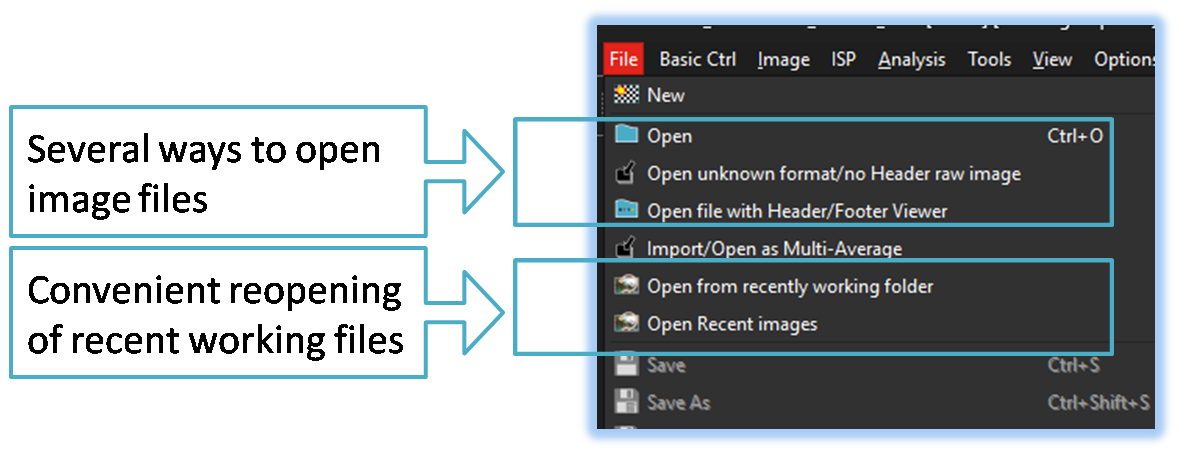
-
Open
Supports opening of standard image formats such as BMP, JPG, and PNG, as well as Bayer raw images with known header formats.
Additionally, When users have previously opened Bayer raw images of unknown format, the tool can retrieve and apply saved configuration data to reopen them easily. -
Open unknown format/no Header raw images

In case the image or raw data file does not include any header information, and/or the user does not have information for the image size or format details,
This menu can helps identify the image dimensions and bit sequence/format. -
Open file with Header/Footer Viewer
This menu help to analysis Header or Footer data including image raw data -
Open from recent working folder
Easily reload previously edited images via frequently accessed folders, enabling efficient project refinement and directory-based image analysis.
