File
-> go to [Menu Home]

The user can create a new image file or open and close existing image files in various formats through the File menu.

-
New
Create new images such as test patterns or color charts.
-
Open
Opens a image file for viewing and basic analysis.
-
Import
Loads multiple images or non-standard formats using advanced import functions for further analysis.
-
Save
Saves the current image or analysis result to a file.
-
Export
Saves processed data or images in a format suitable for external use.
-
Close/Close All
Close the selected image or close all open images.
-
Quit/Exit
All open image files will be closed, and the tool will terminate.

-
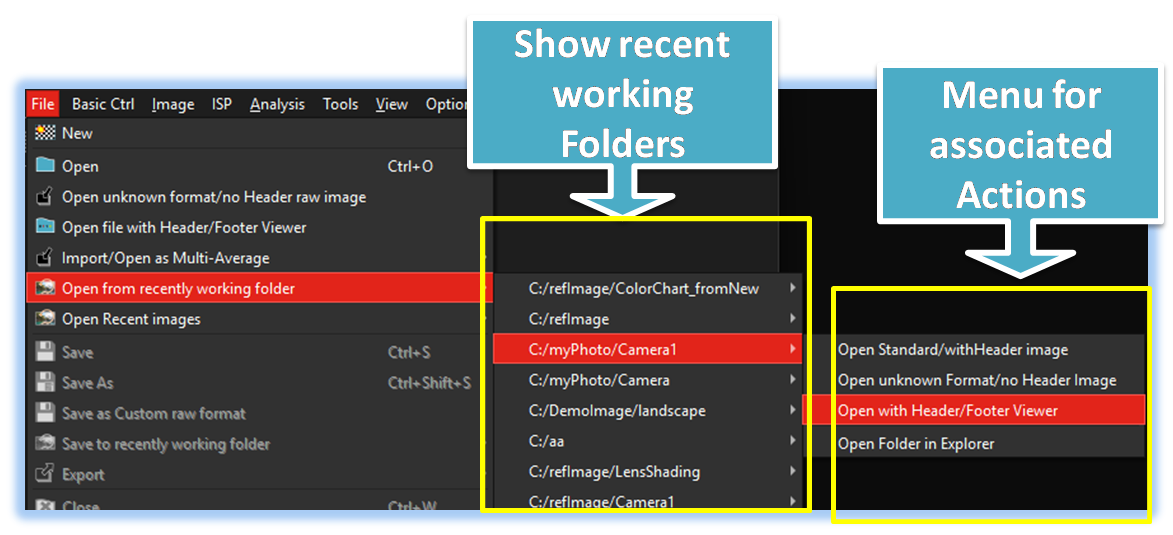
Easy recently working folder/file access
SSImXel not only provides access to recently used files, like standard image tools, but also offers a convenient way to browse frequently accessed folders and efficiently retrieve files through folder-based navigation.