Image Control
-> go to [Menu Home]

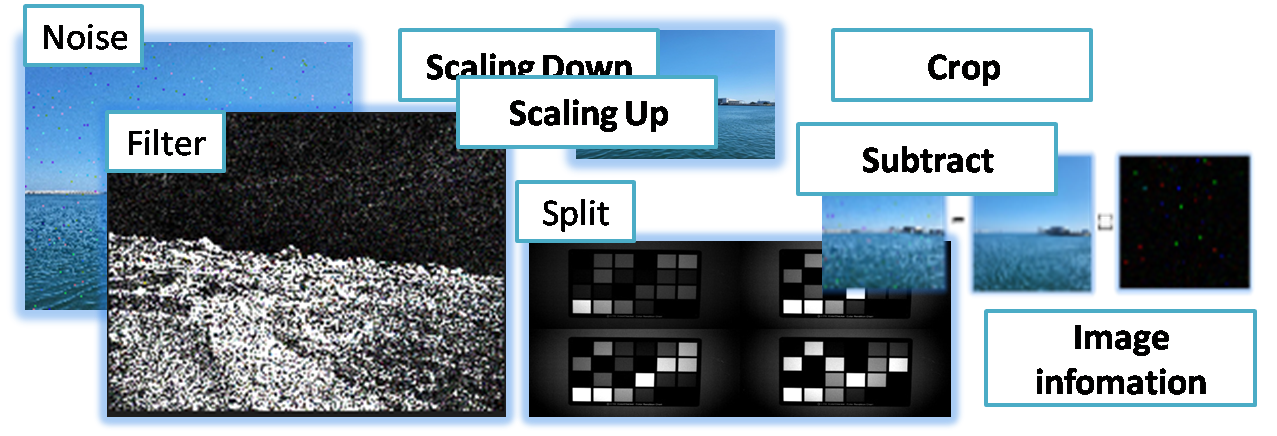
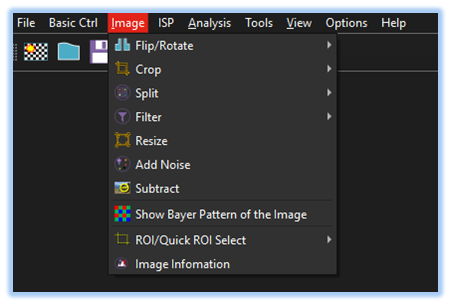
This tool provides essential image data manipulation functions-such as Crop, Split, Filter, Resize, Add Noise, and Subtract-as well as features for displaying detailed image information.
-
Flip/Rotate
Allows User to flip the image horizontally or vertically and rotate the image in 90-degree increments, clockwise and counterclockwise. -
Crop
Allows users to extract a specific portion of an image by defining a Region of Interest (ROI). -
Split
Users can perform channel splitting on color channels, Bayer pattern channels, and bit-level channels for detailed image analysis and processing. -
Filter
SSImXel offers a variety of filters, including low-pass, high-pass, and user-defined convolution filters. -
Resize
Provides functionality for resizing images. -
Add Noise
SSImXel provides functionality for adding Gaussian noise and impulse noise to support various analysis and experimental scenarios. -
Subtract
Subtracts one image from another to highlight differences. -
Pattern
Show the Bayer Pattern of the Image. -
ROI/Quick ROI Select
Various ways of selecting Regions of Interest (ROIs) -
Image Information
Allows users to check various image properties, including bit depth and bit format.